

Dashboard overview
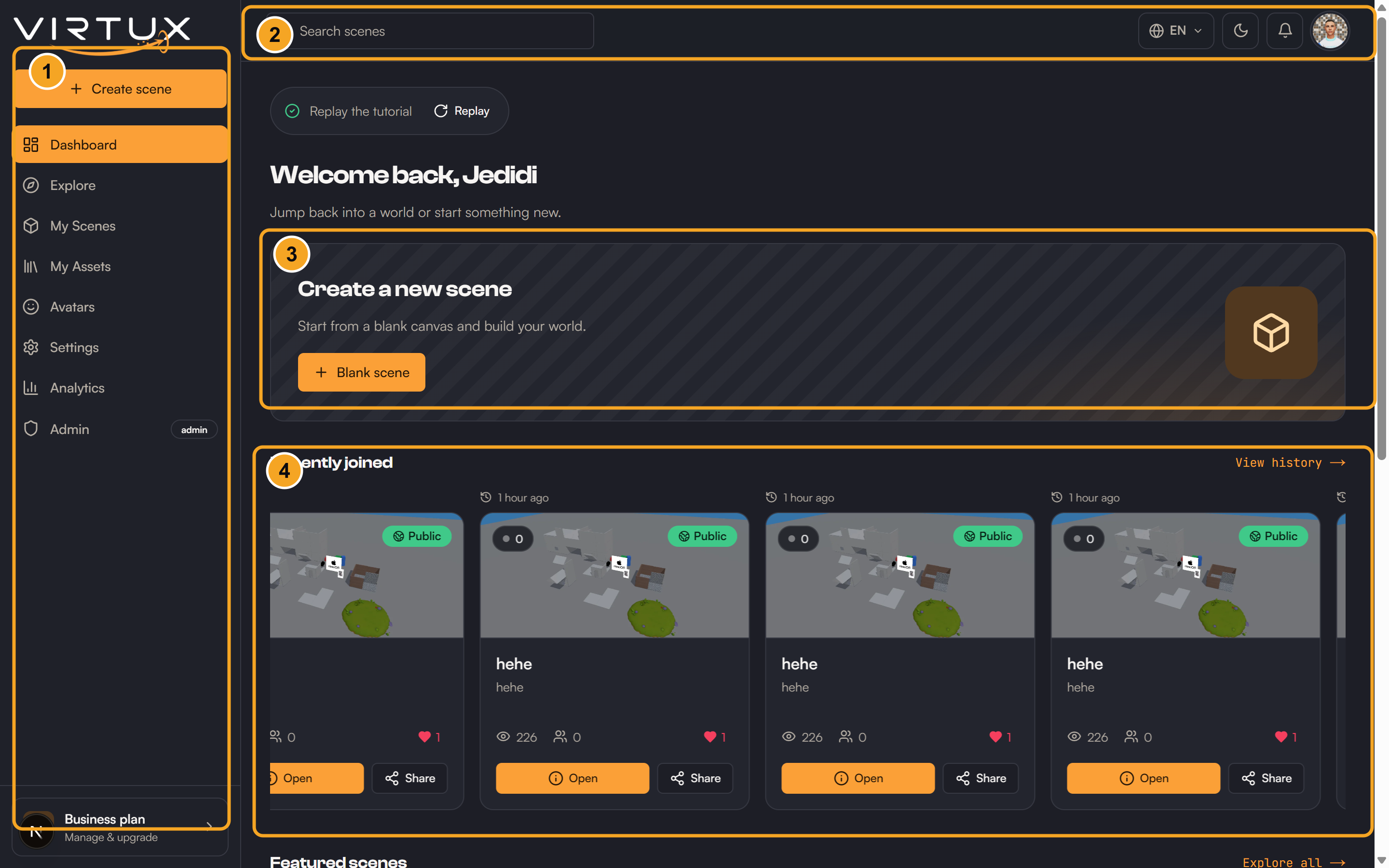
The Dashboard is your home base. The left menu changes the main page, while the top bar gives quick access to notifications, theme, language, account settings, and sign out.
Dashboard home
- Create a new scene starts a blank world you can build and open right away.
- Recently joined lets you jump back into scenes you visited before.
- Featured scenes highlight public experiences to discover.
- Each scene card shows live visitor and view counts, plus quick Open and Share buttons.
- Replay the tutorial restarts the guided in-app walkthrough at any time.
Left-side pages
- Dashboard: your home base with quick create, recently joined, and featured scenes.
- Explore: search and browse public scenes.
- My Scenes: create, open, edit, share, analyze, or delete scenes.
- My Assets: upload and organize reusable models and media.
- Avatars: view your profile summary and choose your avatar.
- Settings: manage account preferences, language, audio, and subscription.
- Analytics: review your own visits, time, distance, and activity.
- Admin: platform administration, shown only to administrators.
Top bar
- Search scenes finds public experiences by name.
- Language changes the displayed language.
- Theme switches between light and dark appearance.
- Bell opens recent notifications.
- The profile menu (your avatar) opens Settings or signs you out.
- On mobile, the menu button opens the left navigation.