

Create a scene
Create a new virtual space from a starting template.
Before you start
- Sign in.
- Check that your plan has room for another owned scene.
- Prepare a short name and description.
Follow these steps
- Open My scenes.
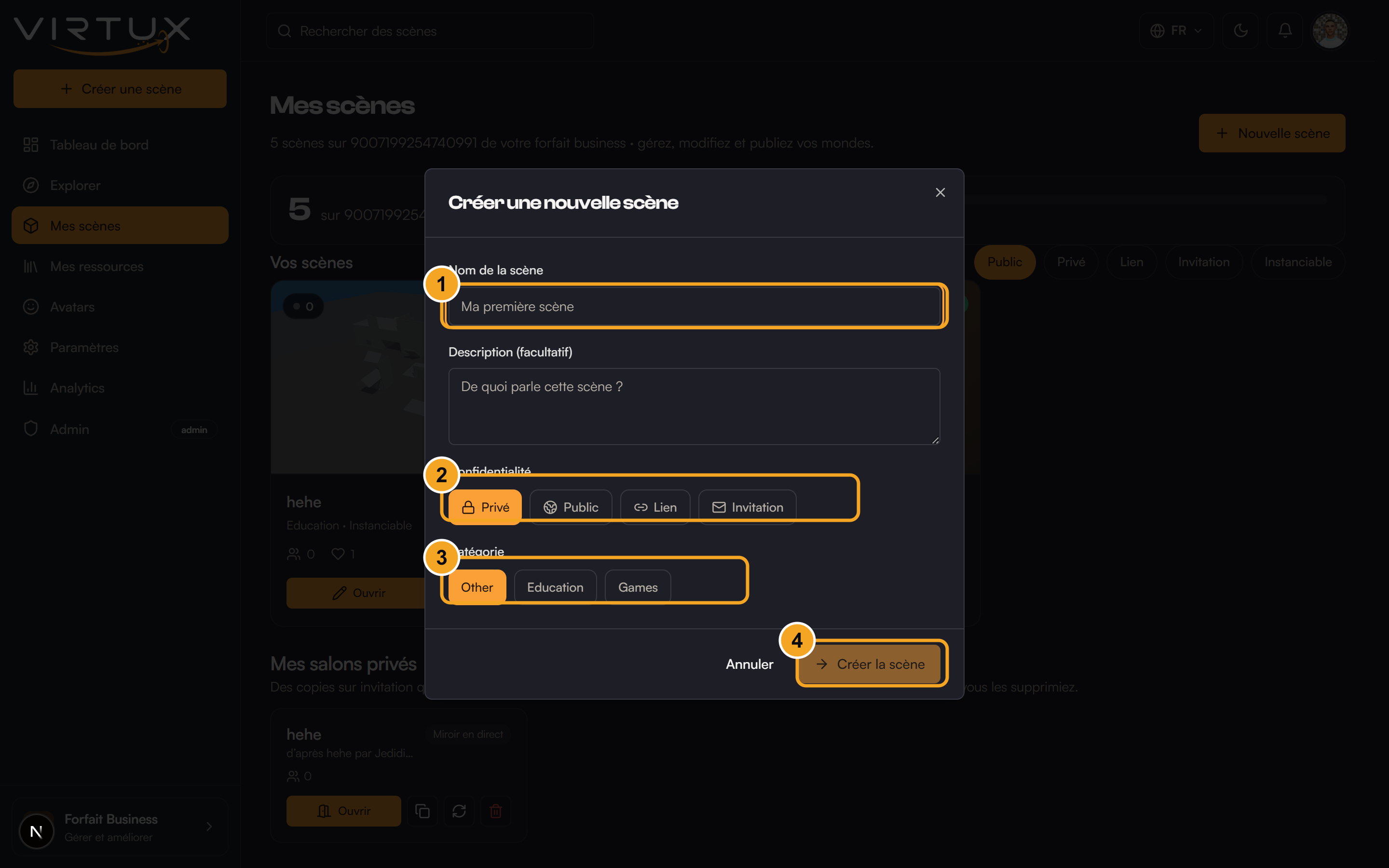
- Choose Create scene.
- Enter a clear Scene name.
- Add an optional description explaining the purpose of the scene.
- Choose Blank, School, Museum, Showroom, or Lab.
- Choose an initial access level. Private is safest while building.
- Choose Create scene.
- Wait for VIRTUX to open the new scene.
Check that it worked
- The scene name appears at the top of the 3D view.
- The scene appears in My scenes.
- Its access badge matches the option you chose.
Useful tips and common mistakes
- Start Private until the scene is ready for visitors.
- Choose a template closest to your goal, but remember that every object can be changed later.
- If Create scene is disabled, make sure the name is not empty.